28-03-2025
New Features
Easier Account Identification for Single PIN Accounts
At Digidentity, we’re dedicated to refining your experience with better clarity and smoother functionality. This week, we’re rolling out new features that improve identity verification and account management.
What is new?
Managing multiple accounts? We’re making it easier to differentiate between them. Now, your email address will be displayed under the account name within the app, helping you quickly identify the correct account when signing in.
Why the change?
Many users with multiple accounts found it confusing to determine which account they were logging into. This update ensures that your email address is displayed under the account name, making it easier to recognise and select the right account at a glance.
Who is impacted?
All Digidentity users will multiple accounts.
Blocked Account Notifications
At Digidentity, we’re committed to providing users with transparency and clarity when accessing their accounts. With our latest update, blocked account notifications are now more informative than ever.
What’s New?
If an account is blocked due to expired or revoked certificates, the app will now clearly display this status. Users will no longer be left wondering why they can't access their account. Instead, they will receive a clear message instructing them to contact our support desk for further assistance.
Why the Change?
Previously, when an account was blocked, the app did not provide a clear explanation, often leaving users confused about why they couldn’t log in.
With this new feature, users will now receive a direct notification informing them that their account is blocked or expired. This ensures they know immediately why they are unable to access their account and what steps they need to take to resolve the issue.
Who Is Impacted?
This update applies to any users with blocked or expired accounts, ensuring they receive clear and actionable information to regain access.
Preventing Duplicate Product Invitations
We're improving the invitation process to prevent errors and ensure a smoother user experience.
What’s New?
Users can no longer be invited to a product they have already purchased. If an email is added for an employee who already has access to the selected product, a warning message will be displayed, and the user will not be added to the invitees list.
Why the Change?
Previously, users who had already purchased a product could still receive invitations for the same product, leading to an error and unnecessary confusion. This update eliminates duplicate invitations before they happen, ensuring a more efficient process.
Who Is Impacted
This update benefits all users and administrators by preventing redundant invitations, reducing errors, and streamlining the onboarding process.
Improvements
Digidentity Updates: Smoother Upgrades & Clearer Instructions
At Digidentity, we’re always working to make your experience as seamless as possible. This week, we’re rolling out improvements to eHerkenning upgrades and evidence uploads in the Digidentity Wallet, ensuring a more intuitive and hassle-free process.
Clearer, Simpler, Better: Uploading Your Letter of Authorisation Just Got Easier
We’ve improved the messaging when uploading the Letter of Authorisation in the Digidentity Wallet to make the steps clearer.
What’s New?
Previously, our instructions simply asked users to scan the letter, which sometimes led to confusion, as some users only scanned the QR code instead of the full document. Now, our updated message explicitly states that the entire letter—including the QR code—must be scanned.
Why the Change?
This small but important tweak removes any confusion among users, ensuring they can complete their uploads correctly on the first try, quickly and without frustration.
Please see below for examples


Easier Account Recovery: Clearer Instructions for Lost Digidentity Wallet Access
Losing access to your Digidentity Wallet can be frustrating, but we’re making recovery simpler and more intuitive with a new update!
What’s New?
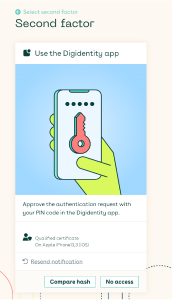
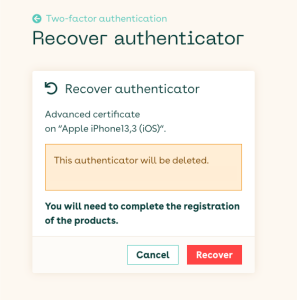
We’ve improved the account recovery process to provide clearer guidance when you need to regain access. If you ever find yourself locked out, here’s what to expect:
1️⃣ Select ‘No access’ during the login process.
2️⃣ Enter your date of birth and a recovery code sent to your email.
3️⃣ Follow the on-screen instructions to complete the recovery.
4️⃣ After regaining access, you’ll receive a message explaining that you’ll need to re-register your products for them to function properly.
Why the Change?
Previously, some users found the recovery process unclear, leading to delays in regaining access. With this update, we’re making sure you have step-by-step guidance to get back into your account quickly and hassle-free.
Who is impacted?
All Digidentity users.
Please see below for examples

Updated Messaging for 'Forgot Your PIN' for SERMI Users
We’re excited to announce an update that enhances the user experience for SERMI users who may need assistance with their PIN.
What’s New?
When SERMI users select “Forgot your PIN”, they will now see their CAB (Conformity Assessment Body) contact details directly in the app. This is designed to streamline the process and ensure users are guided to the correct point of contact for assistance.
Why the Change?
Previously, users facing PIN issues would sometimes contact the service desk for help. However, since SERMI certificate recovery must be handled by the CAB, this new messaging update reduces response times and ensures users are immediately directed to the appropriate support channels.
Who Is Impacted?
This update applies to all SERMI users who may need assistance with PIN recovery or smart card issues, ensuring they are promptly connected with their CAB for resolution.
Bug Fixes
Various issues were resolved, and overall app performance improved to ensure a smoother user experience.
General updates
No General updates to report this week.