23-05-2025
Improvements
What’s New?
We’re pleased to introduce an important improvement for SERMI users:
Users who forget their 5-digit PIN or are locked out of their certificate will now see accurate and helpful messaging explaining the next steps.
Why the Change?
Previously, users were directed to contact the Digidentity Service Desk when their PIN was blocked. However, this was not the correct path, as only the user’s Conformity Assessment Body (CAB) is authorised to reset the certificate.
With this update, users will now be clearly instructed to contact their CAB when their PIN is blocked. This ensures the certificate can be properly reissued through the correct channel.
Who Is Impacted?
This update applies to all SERMI certificate holders and all SERMI CABs, helping reduce confusion and improve support accuracy across the board.
Please see below for examples.

CAB contact information will be displayed when a user selects their account.

New! eSGN User Guide Now Available in the Portal
We’re excited to introduce a helpful new addition to our eSGN portal—a built-in user guide designed to support both new and existing users.
What’s New?
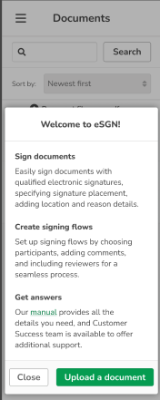
All users can now access an eSGN User Guide directly within the portal.
New users will automatically see the guide after successfully logging into the eSGN portal for the first time.
Existing users can find the guide anytime under the "Need Help?" tab within the portal.
This guide offers step-by-step instructions and useful tips on how to use our eSGN solution effectively.
Please see below for examples.
Desktop/tablet

Mobile

Why the Change?
We want to make sure you always have the support you need right where you need it.
By integrating the user guide directly into the eSGN portal, we’re providing on-demand assistance and ensuring that users can easily understand and navigate the product without needing to reach out separately.
We hope this improvement enhances your experience. As always, we’re here to support your digital signing journey every step of the way!
Who is impacted?
All Digidentity eSGN users.
Improved Role Management in the Self-Service Portal
We’ve made a behind-the-scenes improvement to streamline role management for admins using our Self-Service Portal—making the experience smoother and less confusing.
What’s New?
Previously, if an admin deleted a role name and later tried to reuse it, the system would incorrectly show an error:
"The role name is already taken, please provide a different unique name for the role."
With this update, that issue is resolved. Admins can now reuse a previously deleted role name without receiving an error message.
Why the Change?
This improvement removes unnecessary confusion for admins managing roles in the Self-Service Portal and makes it easier to maintain consistency in role naming.
Who Is Impacted?
This update benefits all eHerkenning users, especially admins who regularly manage user roles within the platform.
Bug Fixes
Various issues resolved, and overall app performance improved to ensure a smoother user experience.
General Update: End of Support for iOS 15
We want to keep you informed about an important platform change affecting iOS users.
What’s Changing?
Starting end of June, iOS 15 will no longer be supported on our platform due to a very limited number of users still using this version.
To continue using our app smoothly and securely, users will need to upgrade to iOS 16 or higher.
What You Need to Do
If you're currently using iOS 15, we recommend updating your device to iOS 16 or above to ensure continued access to our platform and all its features.